Alora Wake - A2P 10DLC Compliance Packet
Consent Flow & Evidence for TCR/Carrier Review
Purpose: This page provides the complete consent workflow, annotated screenshots, and compliance evidence required for carriers and TCR reviewers to validate the Alora Wake emergency-notification use case. All content is publicly accessible for verification.
1. Overview
Alora Wake is an iOS alarm app that allows a user to designate a "Backup Contact" who receives emergency-only SMS alerts if the user fails to dismiss their alarm. This campaign sends only two message types:
- Confirmation SMS — Sent once when a backup contact is added
- Emergency Alert SMS — Sent only if the user does not dismiss an alarm
Messages are strictly event-triggered and never recurring. No marketing or promotional content is ever sent.
Dual-Step Consent Process
- In-app consent from the Alora Wake user — Required checkbox attestation
- SMS confirmation with opt-out for the backup contact — Recipient can reply STOP immediately
⚠️ Important: Two-Party Consent Model
This campaign uses a two-party consent model, which differs from typical SMS campaigns.
Party 1 (App User): The Alora Wake app user designates a backup contact and explicitly attests—via a required checkbox—that they have obtained consent from that person to receive emergency-only SMS alerts.
Party 2 (Backup Contact): The designated contact receives a confirmation SMS with immediate ability to opt out by replying STOP. If they do not reply STOP, consent is implied for emergency-only alerts.
Why this model is appropriate: Messages are emergency-only (missed alarm alerts), backup contacts can immediately opt out, no marketing content is ever sent, and message frequency is minimal and strictly event-triggered.
2. Annotated Screenshots
The following screenshots show the exact in-app user experience from the Alora Wake iOS app.
Screenshot #1 — Enabling "Notify My Backup"
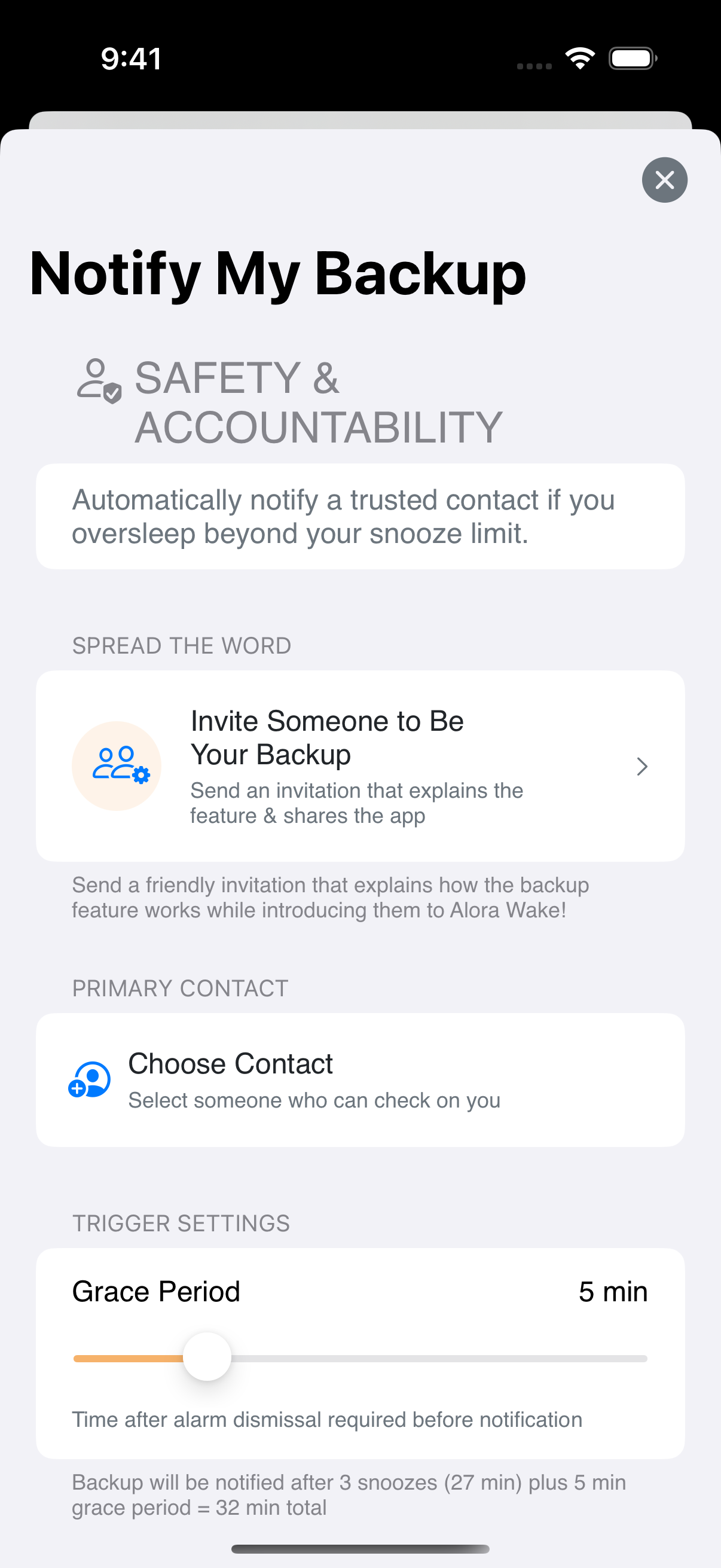
- User must actively enable this feature — it is OFF by default
- No SMS is ever sent automatically
- Feature is found under Settings → Notify My Backup
Screenshot #2 — Selecting a Contact
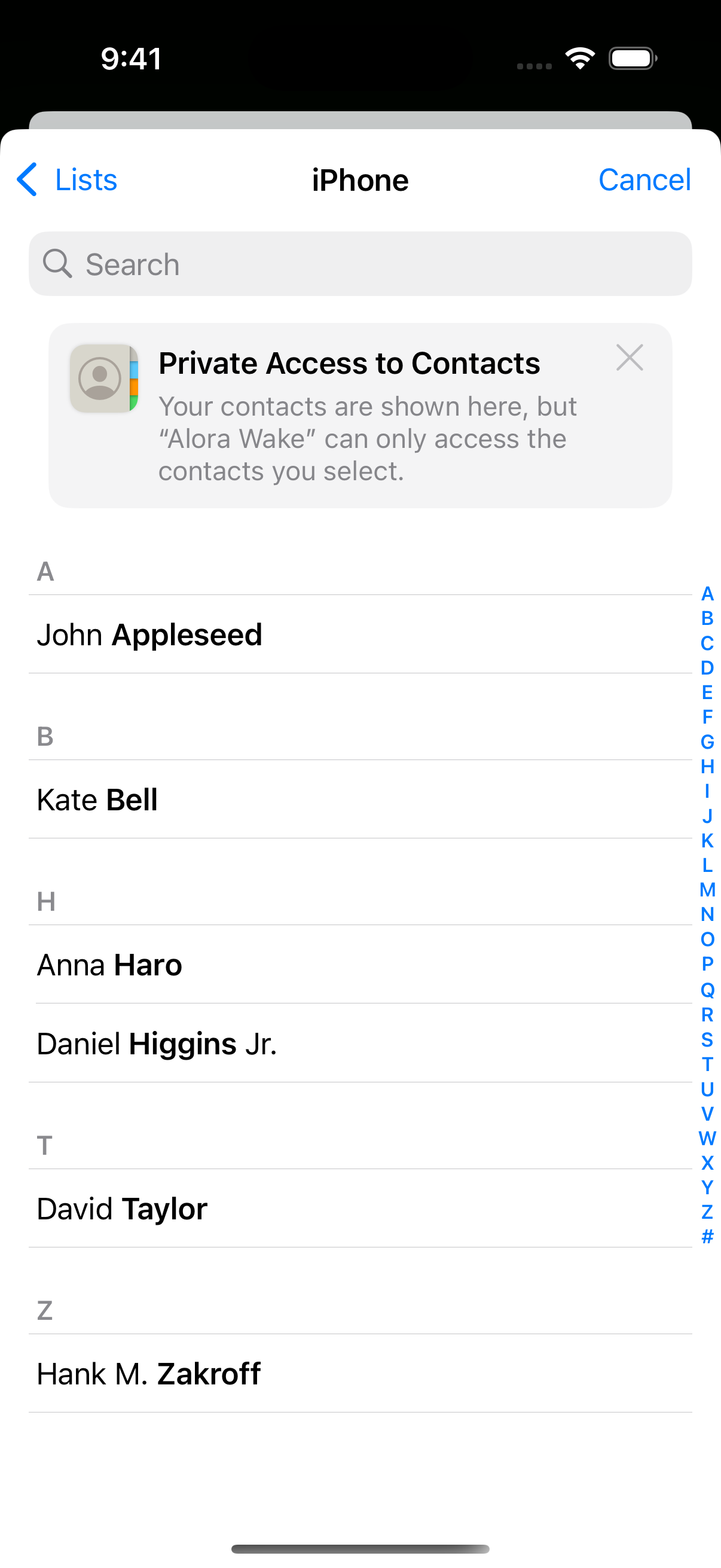
- User manually selects a contact from their iOS Contacts
- No message can be sent until a contact is explicitly chosen
- Contact's name and phone number are displayed for verification
Screenshot #3 — Consent Confirmation (Button DISABLED)
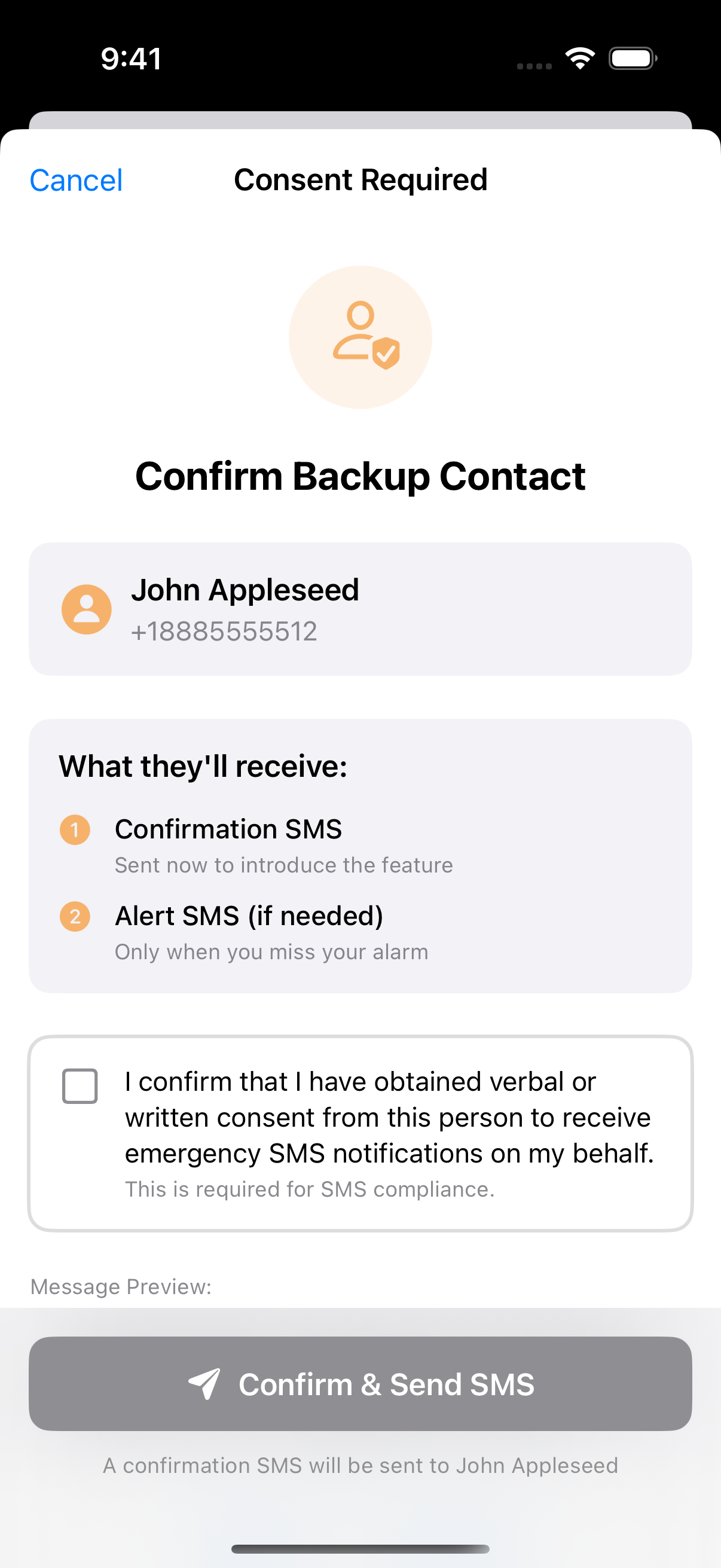
- CRITICAL: The "Confirm & Send SMS" button is DISABLED (grayed out)
- Displays the contact's name and phone number
- Shows the exact SMS message preview that will be sent
- The required consent checkbox must be checked before proceeding
- Links to SMS Terms and Privacy Policy are visible
Screenshot #4 — Consent Confirmation (Button ENABLED)
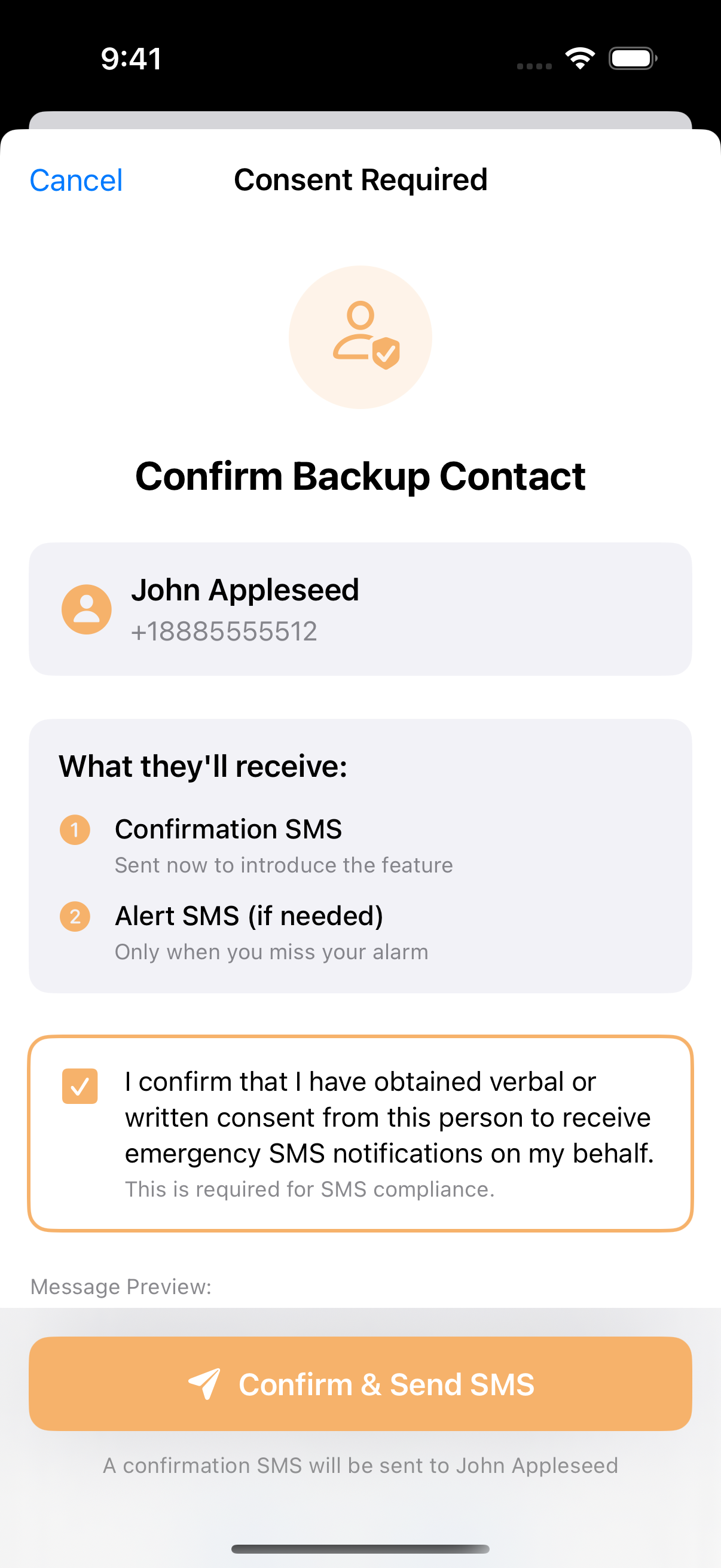
- Required consent checkbox has been manually checked by the user
- The button becomes ENABLED (orange/active) only after consent is confirmed
- This is the only UI path that triggers a confirmation SMS
- Checkbox text: "I confirm that I have obtained verbal or written consent from this person to receive emergency SMS notifications on my behalf."
Screenshot #5 — Message Preview with Required Disclosures
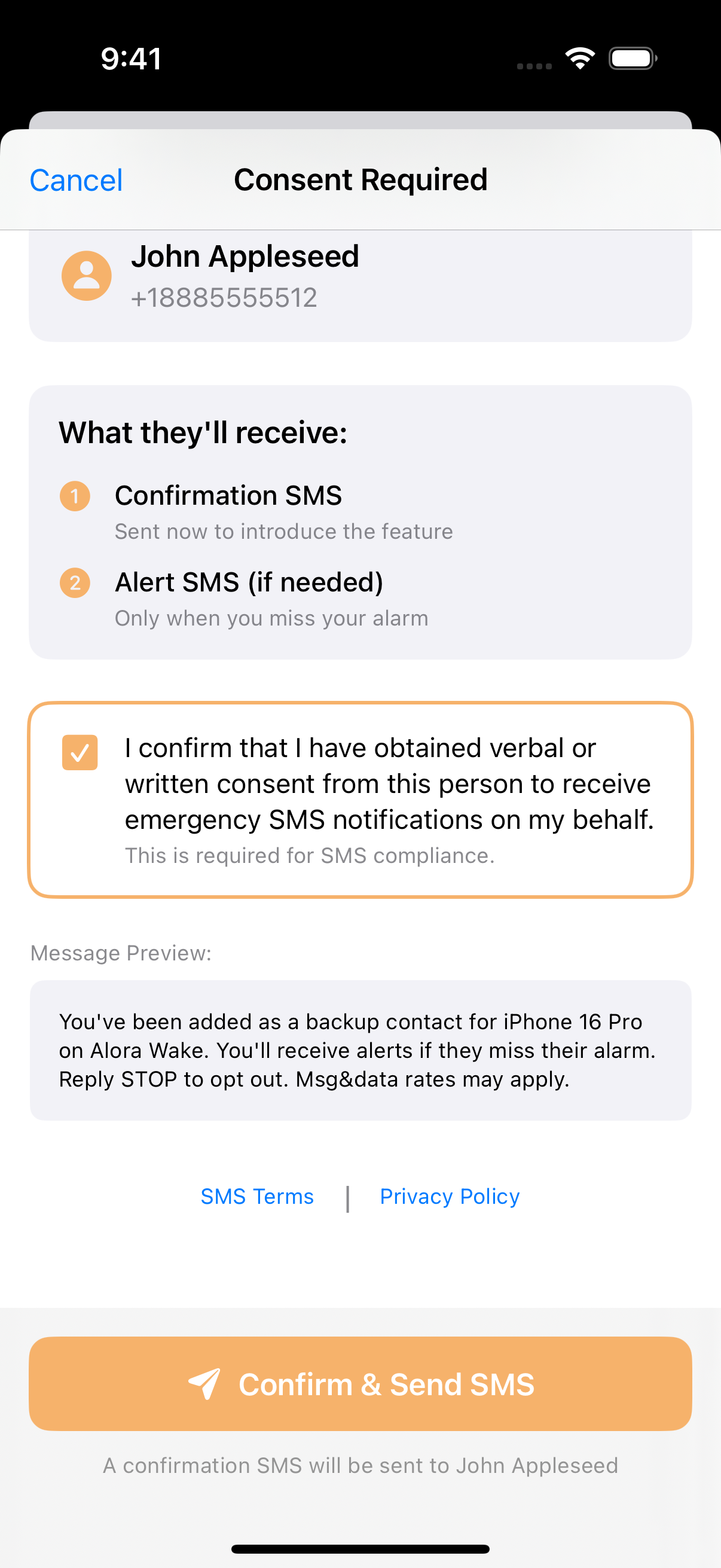
- Exact message text is shown to user before sending
- Brand identification: "Alora Wake" clearly stated
- Opt-out instructions: "Reply STOP to opt out"
- Rate disclosure: "Msg&data rates may apply"
📎 Direct Screenshot Links
If images above do not display, click these direct links:
3. Consent Flow Diagram
4. Sample Messages
Confirmation Message (sent once when added)
Emergency Alert Message (sent only if alarm not dismissed)
5. Message Frequency Disclosure
- Messages are NOT recurring — strictly event-triggered
- One confirmation SMS is sent per added contact (one-time)
- Emergency SMS is sent only if the user fails to dismiss their alarm
- No marketing, promotional, or scheduled messages are ever sent
6. Opt-Out Logic
The backup contact may reply STOP immediately upon receiving the confirmation SMS:
- Reply STOP — No additional messages will be sent
- Reply HELP — Receive assistance information
- Twilio automatically manages all STOP/START/HELP keywords
- The Alora Wake app reflects when a contact has opted out
7. CTIA / Carrier Compliance Checklist
| Requirement | Status | Evidence |
|---|---|---|
| Clear call-to-action | ✔ | Required checkbox + disabled button until checked (Screenshots #3, #4) |
| Message preview shown | ✔ | Exact SMS text displayed on consent screen (Screenshot #5) |
| Brand identification | ✔ | All SMS messages begin with "Alora Wake" |
| STOP opt-out supported | ✔ | Included in every SMS message |
| Rate disclosure | ✔ | "Msg&data rates may apply" in confirmation SMS |
| Public terms page | ✔ | This page is publicly accessible |
| Non-recurring messages | ✔ | Event-triggered only (emergency alerts) |
| Privacy Policy linked | ✔ | Link visible on consent screen, privacy.html Policy states: "Phone numbers are never shared with third parties for marketing purposes" |
8. Reviewer Notes
- The required checkbox ensures the app user confirms consent before any SMS is sent
- The button is disabled by default and only becomes active after checkbox is checked
- Backup contacts may decline immediately via STOP upon receiving confirmation
- No personally identifiable information (PII) is shown in sample messages (uses [Name], [Time] placeholders)
- Use case is non-marketing, emergency-only, event-triggered
- Alora Wake does not use keyword opt-in or web-based opt-in flows — consent is collected in-app
- All screenshots on this page are from the actual production iOS app
9. Originating Number & Customer Care
Originating Phone Number
Messages are sent from a Twilio-provisioned United States 10DLC phone number. The specific number is managed by Twilio's platform and will appear as a standard 10-digit US phone number.
Customer Care Information
| Contact Method | Details |
|---|---|
| Email Support | support@alorawake.com |
| HELP Keyword | Reply HELP to any message for assistance |
| STOP Keyword | Reply STOP to opt out of all messages |
| Website | https://alorawake.com |
HELP Response Message
STOP Response Message
Related Policies
Contact
- Email: support@alorawake.com
- Reply HELP to any message for assistance
Last updated: December 9, 2025